

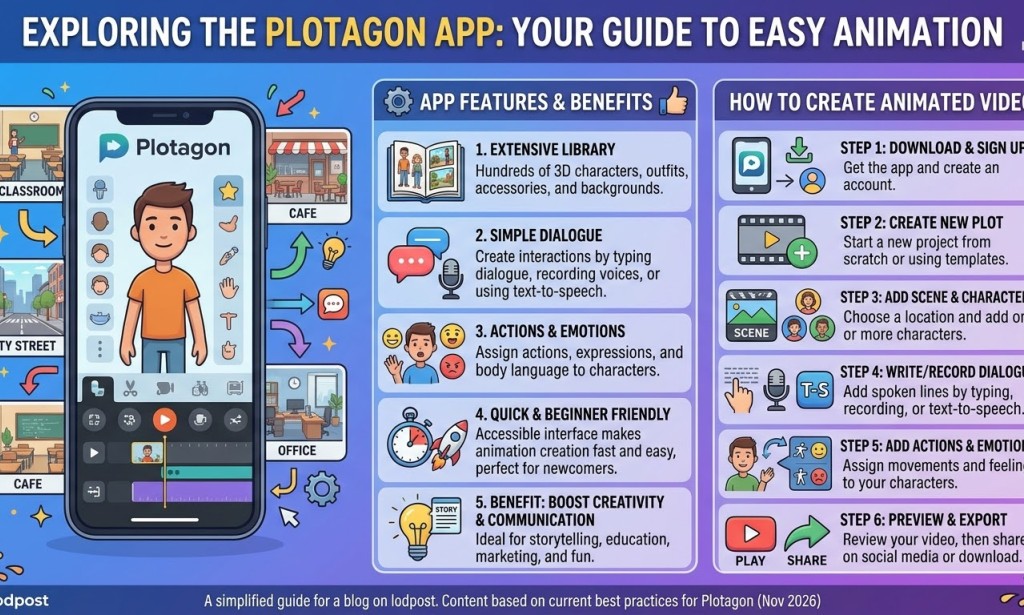
Plotagon App: Features, Benefits and How to Use It for YouTube Automation and Social Media Content Creation
Introduction
Creating engaging video content for social media does not always require an expensive camera, professional actors, or a recording studio. With the right digital tools, anyone can become a content creator using just a smartphone or computer.
One application making animated storytelling easier is Plotagon.
Plotagon is an animation and storytelling application that allows users to create animated videos using virtual characters, different environments, dialogue, facial expressions, and body movements. Instead of recording real people, creators can build scenes with animated characters and bring their stories to life.
Whether you are a beginner, YouTuber, storyteller, comedian, or social media content creator, Plotagon can help you produce entertaining videos without appearing in front of a camera.
In this article, we will explore Plotagon's features, benefits, and how you can use it for YouTube automation and other social media platforms.
What Is Plotagon?
Plotagon is an animated video creation platform designed to make storytelling simple. Users can create characters, select locations, write dialogue, assign voices, and produce animated scenes.
The application is particularly useful for people interested in:
· Animated storytelling.
· Comedy and entertainment.
· Educational videos.
· Short drama series.
· Fictional conversations.
· Social media skits.
· Faceless YouTube content.
One interesting thing about Plotagon is that you do not need advanced animation skills to get started. You can create scenes by selecting characters, choosing actions, and writing what you want them to say.
Key Features of the Plotagon App
1. Customizable Animated Characters
Plotagon allows creators to work with virtual characters. Depending on the available options in your version, you can customize their appearance and create different personalities.
This makes it possible to build a cast of recurring characters for your own animated series.
For example, you could create:
· A funny village chief.
· A stubborn husband.
· A troublesome neighbour.
· A dramatic girlfriend.
· A strict teacher.
· A hilarious pastor.
Using recurring characters can help your audience recognize and connect with your content.
1. Different Scenes and Environments
Plotagon provides virtual environments where your stories can take place.
You can create scenes in locations such as homes, offices, classrooms, and other available settings.
This makes it easier to tell different stories without physically visiting those locations or setting up a recording environment.
1. Dialogue and Voice Features
One of Plotagon's most useful features is its dialogue system.
You can write conversations between characters and assign voices to them using the available voice options.
This is particularly helpful for creators who want to produce animated conversations without recording every character themselves.
1. Facial Expressions and Character Actions
Characters can communicate through facial expressions, gestures, and movements.
These actions make your animated stories more interesting because viewers can see characters reacting to different situations.
For comedy creators, expressions and movements can help make jokes, arguments, misunderstandings, and dramatic moments more entertaining.
1. Multiple Characters in One Story
You can build conversations involving multiple characters.
For example, you could create a three-person comedy scene involving a husband, wife, and neighbour
This makes Plotagon suitable for creating short dramas, fictional interviews, family comedy, and animated conversations.
1. Video Creation and Export
Plotagon supports the creation of animated video scenes that can be rendered and exported, depending on the version and subscription available.
You can then use exported videos in editing applications such as CapCut to add:
· Background music.
· Sound effects.
· Subtitles.
· Intro and outro clips.
· Additional transitions.
· Your personal branding.
Always check the export options and limitations of your current Plotagon version.
Benefits of Using Plotagon for YouTube Automation
YouTube automation involves building a content production process that reduces the amount of manual work involved in creating and publishing videos. It does not mean that a channel can grow or earn money without human involvement.
Plotagon can be a useful tool in this process.
1. Create Faceless YouTube Videos
You do not necessarily need to show your face to create entertaining YouTube content.
With Plotagon, you can use animated characters to tell stories, explain concepts, and entertain viewers.
This is useful for creators who prefer to remain behind the scenes.
1. Produce Original Storytelling Content
Instead of relying entirely on clips from other creators, you can write your own scripts and turn them into animated episodes.
Some content ideas include:
· African family comedy.
· Village stories.
· Relationship drama.
· Office comedy.
· School drama.
· Mystery and suspense.
· Life lessons.
Original storytelling gives you greater creative control and reduces your dependence on other people's copyrighted footage.
1. Build an Animated YouTube Series
One of the biggest advantages of Plotagon is the opportunity to develop recurring characters and storylines.
For example, you could create a series called The Trouble in My Neighbourhood.
Each episode could introduce a new problem while maintaining the same characters.
This encourages viewers to follow the story and return for future episodes.
1. Save Time on Video Production
Traditional video production may involve finding actors, recording equipment, locations, and other resources.
Plotagon simplifies some of these requirements by allowing you to build scenes digitally.
You still need to write scripts, arrange scenes, edit videos, and publish content, but the production process can be more manageable.
1. Create Content Without Expensive Equipment
Beginners can experiment with animated storytelling without purchasing cameras, lighting equipment, or microphones.
Your smartphone, Plotagon, and a video editing application may be enough to begin.
How to Use Plotagon for Other Social Media Platforms
Plotagon is not limited to YouTube. Its animated videos can also be adapted for other platforms.
Facebook is suitable for short animated comedy, drama, and episodic storytelling.
You can:
· Publish short animated episodes as Reels.
· Create a dedicated playlist or video series.
· Share funny animated conversations.
· Build a page around original fictional characters.
TikTok
TikTok is particularly suitable for short, entertaining animated scenes.
Some content ideas include:
· Funny relationship conversations.
· Unexpected plot twists.
· African parent and child comedy.
· Short village comedy.
· Funny misunderstandings.
Focus on capturing viewers' attention within the first few seconds.
Instagram Reels can be used to share short animated stories, funny conversations, and memorable moments from longer episodes.
You can also use Instagram Stories to announce new episodes.
YouTube Shorts
YouTube Shorts can help introduce your animated characters to new audiences.
You can extract interesting moments from longer episodes and publish them as short videos.
For example, a five-minute animated comedy episode could provide several shorter clips.
Plotagon and CapCut: A Powerful Combinatio
Plotagon handles the animated storytelling, while CapCut can help improve the final video
A simple workflow looks like this:
1. Write your story or comedy script.
2. Create your characters in Plotagon.
3. Select the appropriate environment.
4. Add dialogue and character actions.
5. Generate and export your scenes.
6. Import the scenes into CapCut.
7. Add subtitles, sound effects, music, and transitions.
8. Export in the correct format for your social media platform.
9. Publish and engage with your audience.
For vertical platforms, use a 9:16 video format where supported. For standard YouTube videos, consider 16:9.
Is Plotagon Good for Beginners?
Yes. Plotagon can be a useful starting point for beginners interested in animated video creation.
You do not need to be a professional animator or filmmaker to experiment with the platform.
However, creating successful content still requires creativity, storytelling, consistency, and an understanding of your target audience.
It is also important to check the application's current pricing, available features, export restrictions, and commercial-use terms before building a monetized content business around it.
Can You Monetize Plotagon Videos?
Plotagon videos can potentially be used in monetized content, provided you comply with the platform's commercial-use terms and the monetization policies of the social media platform where you publish them.
For YouTube, creating animated videos alone does not guarantee monetization.
Your content should provide original value through storytelling, commentary, education, entertainment, or meaningful creative input.
Avoid simply producing repetitive, low-effort videos. Focus on original scripts, interesting characters, quality editing, and engaging stories.
Tips for Creating Successful Plotagon Content
Here are some practical tips:
1. Develop unique characters: Give every character a distinct personality.
2. Write interesting scripts: Make your conversations natural, funny, or emotionally engaging.
3. Keep short videos entertaining: Avoid unnecessary dialogue and lengthy introductions.
4. Create episodic content: Give viewers a reason to watch the next episode.
5. Use subtitles: Help viewers understand conversations, especially when watching without sound.
6. Add sound effects: Use appropriate sounds to improve comedy and dramatic scenes.
7. Maintain consistency: Use recurring characters and a recognizable storytelling style.
8. Create original stories: Build your own identity instead of copying existing creators.
Conclusion
Plotagon is an interesting tool for anyone who wants to explore animated storytelling and digital content creation.
From YouTube automation to Facebook Reels, TikTok videos, Instagram Reels, and YouTube Shorts, the platform provides an alternative way to produce entertaining content without traditional video recording.
For beginners, it can be an opportunity to experiment with animation, develop storytelling skills, and build an original content brand.
The secret is not just having the application. It is knowing how to use it to tell stories that people enjoy watching and sharing.
Start creating, experiment with different characters, and turn your imagination into entertaining animated stories.
Frequently Asked Questions (FAQs)
1. Is Plotagon free?
Plotagon's available features and pricing depend on the current version and subscription options. Check the official application listing for the latest details.
1. Can I use Plotagon on my phone?
Plotagon has offered mobile applications, but device compatibility and availability may vary. Check your app store for the current version.
1. Can I use Plotagon for YouTube automation?
Yes. It can be part of a video production workflow for creating animated stories, comedy, and faceless content.
1. Can I upload Plotagon videos to Facebook and TikTok?
Yes, provided your exported videos meet the platforms' technical requirements and comply with their content policies.
1. Can Plotagon videos be monetized?
Potentially, yes. You must comply with Plotagon's applicable licensing terms and the monetization policies of the platform where you publish.
1. Do I need animation skills to use Plotagon?
No advanced animation skills are required to get started. The application provides tools that simplify character-based storytelling.
1. Can I edit Plotagon videos with CapCut?
Yes. You can import exported scenes into CapCut and add subtitles, music, sound effects, transitions, and other editing elements.


You must be logged in to post a comment.