
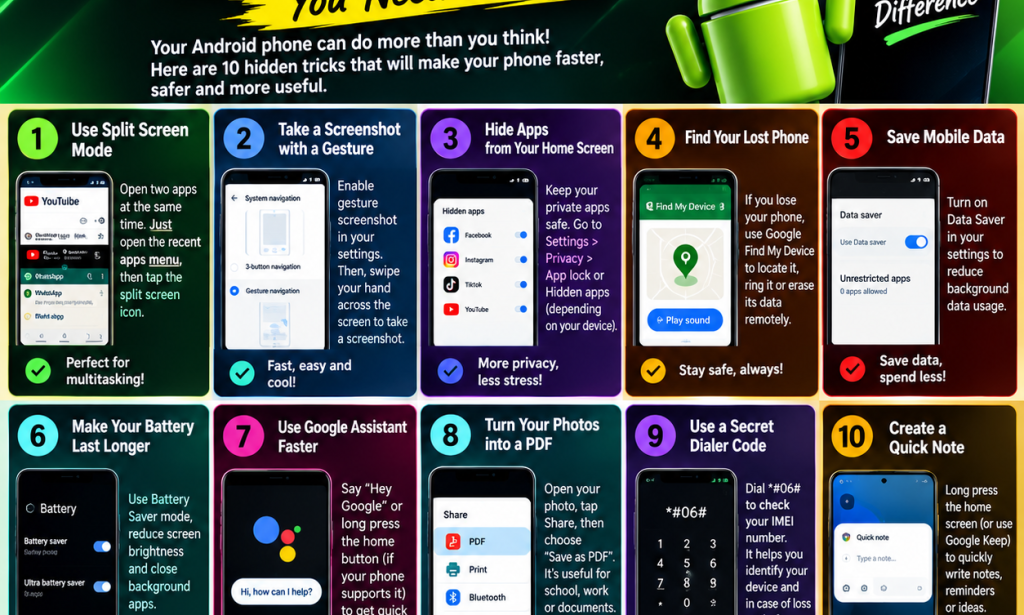
🔥 10 HIDDEN ANDROID TRICKS YOU NEED TO KNOW! 📱🤯
Do you know that your Android phone can do more than you think? 😱 Many people use their phones every day without knowing some of the amazing features hidden inside them.
The good news is that you don't need to buy an expensive phone to enjoy useful features. Your Android phone may already have tools that can make your daily activities easier!
Today, I'm sharing 10 useful Android tricks you should know. 🚀📱
📱 1. Use Two Apps at the Same Time
Did you know you can use two apps on your screen simultaneously?
For example, you can watch a video while chatting with your friends.
How to do it:
Open your recent apps screen.
Tap the app icon above the app preview.
Select Split screen if available.
Choose the second app.
Note: Not every Android phone or app supports split-screen mode.
📸 2. Take Screenshots Easily
You don't always need to press buttons to take a screenshot.
On many Android phones, you can:
Press the power and volume-down buttons together.
Use a three-finger gesture if your phone supports it.
Use a screenshot option in Quick Settings.
Check your phone's settings to discover the screenshot methods available on your device.
🔒 3. Protect Your Private Apps
Do you want to keep certain apps more private?
Depending on your phone model, you may be able to use:
App Lock.
A Private Space feature.
A Secure Folder.
Hidden apps.
Open your phone's security or privacy settings to check which options are available.
Remember: Hiding an app is not always the same as securing its contents.
📍 4. Find Your Lost Phone
Losing your phone can be stressful, but Android offers tools that may help you locate it.
How to get started:
Open Google's official Find Hub service on another device.
Sign in with the Google account connected to your missing phone.
Check whether its location is available.
Use the available options to secure or locate your device.
Your phone generally needs to meet certain conditions, such as having power and connectivity, for location features to work properly.
💾 5. Save Your Mobile Data
Are you tired of your data finishing too quickly? Try using Android's Data Saver feature.
Steps:
Open Settings.
Select Network & Internet or Connections.
Find Data Saver.
Turn it on if available.
This feature can reduce background mobile data usage, although the exact settings depend on your phone.
🔋 6. Make Your Battery Last Longer
Want your battery to last longer throughout the day? Try these simple tips:
✅ Turn on Battery Saver when needed.
✅ Reduce your screen brightness.
✅ Set a shorter screen timeout.
✅ Restrict unnecessary background activity.
✅ Avoid exposing your phone to excessive heat.
These steps can help reduce battery consumption and make your phone more convenient to use.
🤖 7. Use Google Assistant or Gemini
Your Android phone may have a voice assistant that can help with everyday tasks.
Depending on your device and settings, you may be able to use it to:
Set reminders.
Ask general questions.
Create alarms.
Check the weather.
Help with simple tasks.
Check which assistant is available on your phone and configure it through its official settings.
📄 8. Turn Documents Into PDF Files
Did you know your phone can help you create PDF documents?
You can use a scanning app or a compatible document app to turn paper documents into digital files.
Try this:
Open a document-scanning app.
Take a clear picture of the document.
Adjust the edges if necessary.
Save or export it as a PDF.
This is useful for students, teachers, and business owners.
🔢 9. Check Your Phone's IMEI Number
Your phone has an identification number called an IMEI.
On many phones, you can check it by opening the dialer and entering:
*#06#
The IMEI may help identify your device when dealing with your network provider or the manufacturer.
⚠️ Important: Keep your IMEI private. Do not post it publicly or share it with strangers.
📝 10. Create Quick Notes and Reminders
Do you sometimes forget important ideas or tasks?
Use a notes app to record them immediately.
You can write down:
School assignments.
Business ideas.
Shopping lists.
Important reminders.
Content ideas for your social media page.
Some phones also support quick notes from the home screen or lock screen.
🎯 BONUS: Make Your Android Phone Work Better!
Here are five additional tips to remember:
🔥 Restart your phone if it becomes unusually slow.
🔥 Keep your apps and software updated.
🔥 Remove unnecessary files to free up storage.
🔥 Download apps from trusted sources.
🔥 Use a screen lock to protect your personal information.
💡 CONCLUSION
Your Android phone is more powerful than you may realise! By learning these useful tricks, you can make everyday tasks easier, improve your privacy, manage your data, and get more out of your device.
You don't need to know every feature at once. Start by trying one or two tricks today!
📢 If you found these tips helpful, SHARE this article with your friends so they can discover these Android tricks too! ❤️📱
🔥 FOLLOW VÎÇKY TÉÈ FOR MORE!
Follow Vîçky Téè for more Android tricks, AI tutorials, technology news, graphic design ideas, and useful phone tips.


You must be logged in to post a comment.