

🌐 HOW TO LEARN WEB DESIGN WITHOUT CODING! 💻🔥
Have you ever wanted to create your own website but thought you needed to be a professional programmer? 🤔
Good news! You can learn web design without writing a single line of code! 🎉
With the right tools, you can design beautiful websites for businesses, schools, personal brands, and online stores using your phone or computer.
Web design is a valuable digital skill that can help you build your online presence, work with clients, and explore opportunities to earn money.
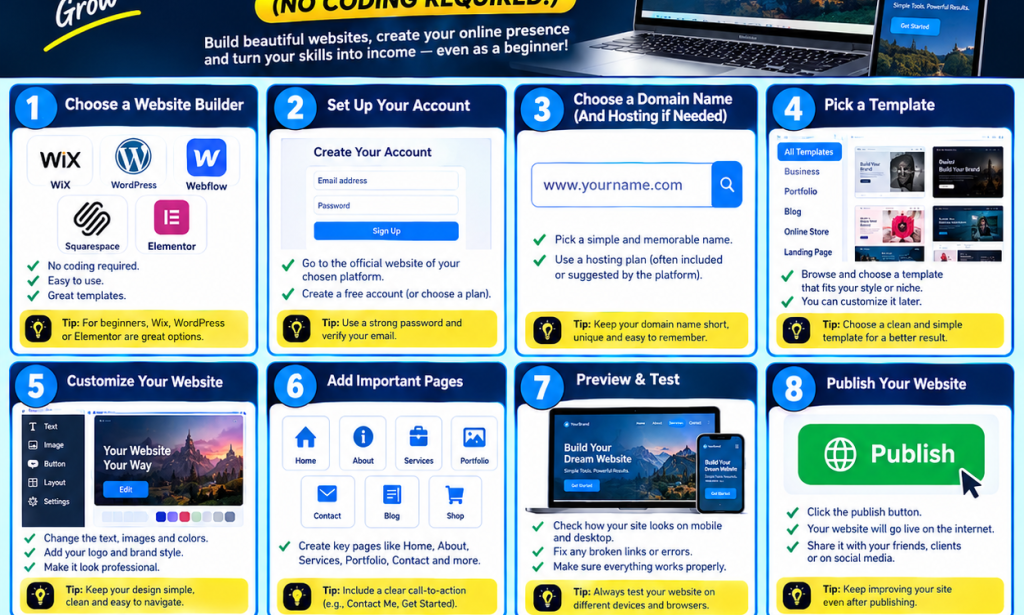
🚀 1. Choose a Website Builder
The first step is to choose a website-building platform. Some popular options include:
✅ Wix — beginner-friendly website builder.
✅ WordPress — flexible platform for different types of websites.
✅ Webflow — offers advanced visual website design tools.
✅ Squarespace — provides professionally designed templates.
✅ Elementor — helps you visually design WordPress websites.
Choose a platform that matches your needs, budget, and experience level.
📝 2. Create Your Account
Visit the official website of your chosen platform and create an account if required.
Some platforms offer free plans, while others require payment for certain features.
Tip: Start with a free plan or trial when available so you can practise before spending money.
🌍 3. Choose a Domain Name
A domain name is the address people use to visit your website.
For example:
www.yourbrand.com
www.yourbusiness.com
Choose a name that is simple, professional, and easy to remember.
You may also need web hosting, depending on the platform you choose.
🎨 4. Select a Website Template
Templates are ready-made website designs that you can customize.
You can find templates for:
Business websites
Personal portfolios
Online shops
School websites
Blogs
Entertainment websites
Choose a clean design that suits your purpose.
🖌️ 5. Customize Your Website
Now it's time to make the website your own!
You can customize:
Text and headings
Images and videos
Background colours
Fonts and buttons
Page layouts
Logos and branding
Keep your design simple, attractive, and easy to navigate.
📄 6. Add Important Pages
Most professional websites need a few essential pages.
These may include:
🏠 Home: Introduces your website.
👤 About: Explains who you are or what your business does.
🛠️ Services: Shows the services you offer.
🖼️ Portfolio: Displays your work and projects.
📞 Contact: Shows visitors how to reach you.
You can add other pages depending on your website's purpose.
📱 7. Make Your Website Mobile-Friendly
Many people browse the internet using their smartphones.
Make sure your website looks good on both phones and computers. Check that the text is readable, images display correctly, and buttons are easy to tap.
Tip: Always preview your website on different screen sizes before publishing it.
🚀 8. Publish Your Website
Once your website is ready, preview it carefully and correct any mistakes.
Check your spelling, links, images, and contact details. Then use the platform's publishing option to make your website available online.
You can share the website with friends, customers, or potential clients.
💰 9. How Can You Make Money From Web Design?
After learning and practising web design, you can explore different opportunities, such as:
✅ Designing websites for small businesses.
✅ Creating personal portfolio websites.
✅ Building websites for schools and organizations.
✅ Helping businesses improve their existing websites.
✅ Creating websites for your own brand or business.
Start by building sample projects to demonstrate your skills. As your experience grows, you can build a portfolio and look for clients.
Remember, earning money is not guaranteed. Your results will depend on your skills, the quality of your work, and your ability to find customers.
💡 EXTRA TIPS FOR BEGINNERS
🔥 Practise regularly.
🔥 Learn the basics of good design.
🔥 Use high-quality images.
🔥 Keep your layouts simple and professional.
🔥 Build sample websites to improve your skills.
🔥 Learn basic HTML and CSS later if you want more control over your designs.
🎯 CONCLUSION
You don't need to be an expert programmer to start learning web design. With beginner-friendly website builders, you can begin creating websites and developing valuable digital skills.
Start small, practise consistently, and turn your creativity into a useful skill! 💻🌐
📢 Do you want to learn web design?
👍 Like this post.
💬 Comment “WEB DESIGN” if you want more tutorials.
🔄 Share this article with your friends.
❤️ Follow Vîçky Téè for more technology tips, AI tutorials, graphic design, and digital skills!


You must be logged in to post a comment.