
Do you enjoy classic games like GTA, God of War, Tekken 6, and FIFA? You can play many compatible PlayStation Portable (PSP) games on your Android phone using an emulator called PPSSPP.
In this guide, you will learn how to install PPSSPP, organise your game files, start playing, and improve performance.
1. What Is PPSSPP?
PPSSPP is a PSP emulator that allows you to play compatible PSP games on Android phones, computers, and other supported devices.
Its features include customisable touchscreen controls, save states, support for compatible game controllers, and graphics settings that can improve visual quality on supported devices.
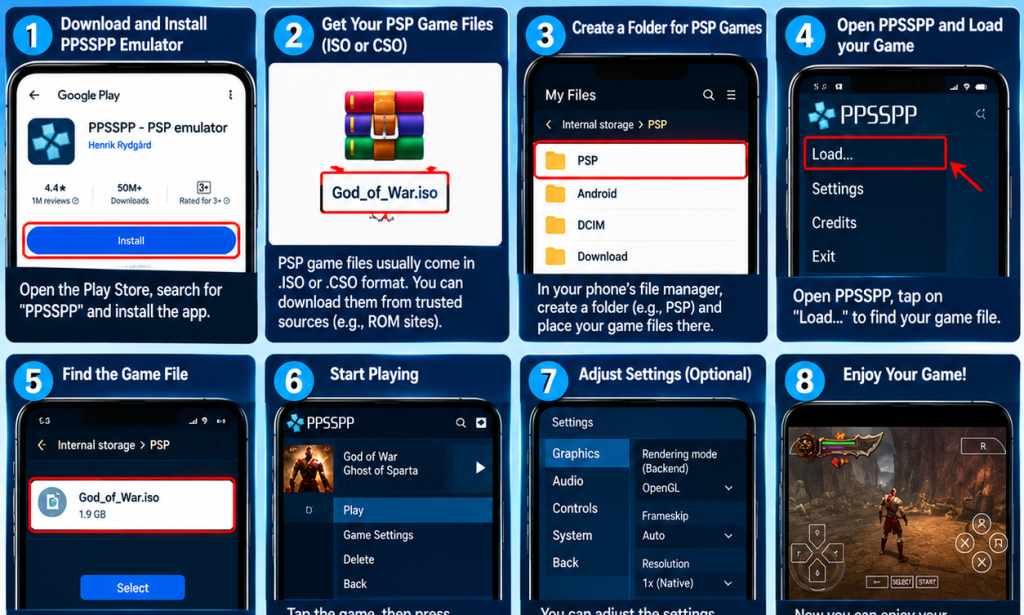
2. Download PPSSPP
- Open the Google Play Store on your Android phone.
- Search for PPSSPP - PSP emulator.
- Check that you have selected the official application.
- Install and open it.
You can also visit the official PPSSPP website for download information.
3. Get Your PSP Game Files
PPSSPP supports compatible PSP game files in formats such as ISO and CSO. You need a valid game file before you can play.
You can use homebrew games distributed by their creators or make a digital copy of a PSP game you own where permitted by applicable law. Avoid unauthorised downloads of copyrighted games and files from suspicious websites.
4. Organise Your Game Files
- Open your phone's file manager.
- Create a folder called PSP Games.
- Place your legally obtained ISO or CSO files in that folder.
- Remember the folder location so you can find your games easily.
5. Open and Play a PSP Game
- Launch PPSSPP.
- Browse to the folder containing your game files.
- Find the game you want to play.
- Tap its icon to launch it.
If the game file is valid and the title is compatible, it should start. Some games may require additional configuration.
6. Improve Performance on Your Android Phone
If a game runs slowly or experiences lag, try these tips:
- Reduce the rendering resolution.
- Close unnecessary background applications.
- Keep enough free storage space available.
- Experiment with the emulator's graphics settings.
- Update PPSSPP using an official source.
Performance depends on your phone's hardware and the game being played, so the best settings may differ from one device to another.
7. Connect a Game Controller
You may be able to connect a compatible game controller to your Android phone through Bluetooth or USB. Open PPSSPP's control settings to configure the buttons.
A controller can make fighting, racing, football, and adventure games more comfortable to play.
8. Popular PSP Games to Explore
- Grand Theft Auto: Vice City Stories
- God of War: Ghost of Sparta
- God of War: Chains of Olympus
- Tekken 6
- FIFA Street 2
- Need for Speed: Most Wanted 5-1-0
These are well-known PSP titles, but you will need compatible game files that you are legally entitled to use. Performance varies depending on your phone.
Bonus Tips for PSP Gamers
- Make sure your phone has enough storage space.
- Download PPSSPP from an official source.
- Keep backups of your game saves.
- Adjust settings if a game runs slowly.
- Avoid suspicious downloads and applications.
Conclusion
PPSSPP makes it possible to enjoy many classic PSP games directly on your Android phone without needing the original handheld console. Install the emulator, prepare compatible game files, adjust your settings, and start exploring your favourite games.
Disclaimer: PPSSPP is an emulator, not a distributor of commercial PSP games. Obtain game files legally and respect copyright laws.


You must be logged in to post a comment.