

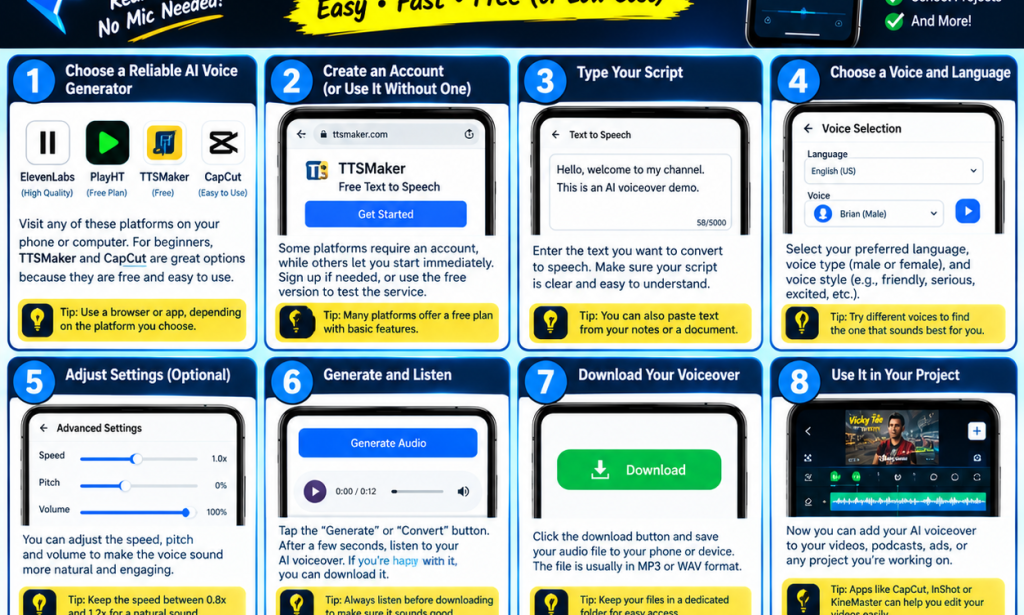
🎙️ HOW TO MAKE AI VOICEOVERS FOR YOUR VIDEOS
Have you ever watched a video on TikTok, Facebook, or YouTube and wondered how the creator added a clear, professional voice without recording their own voice? 🤔
The secret may be AI voiceovers! 🤖🎤
AI voiceovers allow you to turn written text into spoken audio using artificial intelligence. You can use them for comedy videos, educational content, storytelling, advertisements, tutorials, and many other types of content.
The good news is that you can create AI voiceovers using your phone!
🔥 1. Choose an AI Voice Generator
First, choose a tool that can convert text into speech. Some popular options include:
ElevenLabs: Known for realistic AI voices.
TTSMaker: A simple option for converting text into speech.
CapCut: Offers text-to-speech features for supported devices, languages, and versions.
PlayHT: Provides AI voice-generation tools for content creators.
You can visit their official websites or check whether their apps are available on your device. Free features and usage limits may vary.
✍️ 2. Write Your Script
Before generating your voiceover, write down what you want the AI to say.
For example, if you are making a comedy video, your script could be:
"When you tell your friend that you have money, suddenly everybody remembers your phone number!" 😂
Keep your sentences clear and natural so the AI can pronounce them properly.
🗣️ 3. Choose Your Preferred Voice
Most AI voice generators allow you to choose different voices.
Depending on the tool, you may find:
Male voices
Female voices
Different accents and languages
Funny or energetic voices
Calm and professional voices
Choose a voice that matches the mood of your video.
⚙️ 4. Adjust the Voice Settings
Some tools allow you to adjust the speaking speed, pitch, or style.
For comedy videos, an energetic voice may work well. For educational videos, a clear and calm voice may be better.
Tip: Listen to different options before choosing the final voice.
🎧 5. Generate Your AI Voiceover
After writing your script and selecting a voice, click the Generate or Convert to Speech button.
Wait for the audio to finish processing, then listen to the result. If you notice pronunciation mistakes, edit your script and generate it again.
📥 6. Download Your Audio
When you are happy with the result, download the voiceover to your phone.
Depending on the tool, the audio may be available in MP3 or WAV format. Check the tool's usage terms, especially if you plan to use the audio for monetized content.
🎬 7. Add the Voiceover to Your Video
Now it's time to make your video interesting!
Open a video editor such as CapCut, import your video, and add the downloaded audio. Adjust the timing so the voice matches the action on the screen.
You can also add:
Captions and subtitles
Background music
Sound effects
Transitions
Relevant images or clips
Make sure the background music is not louder than the voiceover.
💡 8. Create Amazing Content With AI
You can use AI voiceovers for many types of content, including:
✅ Comedy skits
✅ Facebook Reels
✅ TikTok videos
✅ YouTube videos
✅ Educational tutorials
✅ Motivational messages
✅ Storytelling
✅ Business advertisements
Always check the tool's terms and use permission before cloning another person's voice. Avoid using AI voices to impersonate people or mislead your audience.
🎯 CONCLUSION
AI voiceovers make video creation easier, especially for beginners who do not want to record their own voices.
With your phone, a good script, an AI voice generator, and a video editor, you can start creating engaging content today!
You don't need expensive equipment to begin. Start with what you have, practise regularly, and improve with every video. 🚀
📢 Do you want to learn more about AI tools for content creation?
👍 Like this post.
💬 Comment “AI VOICE” if you want more AI tutorials.
🔄 Share this article with your friends.
❤️ Follow Vîçky Téè for more technology tips, AI tutorials, comedy, and entertainment!


You must be logged in to post a comment.