
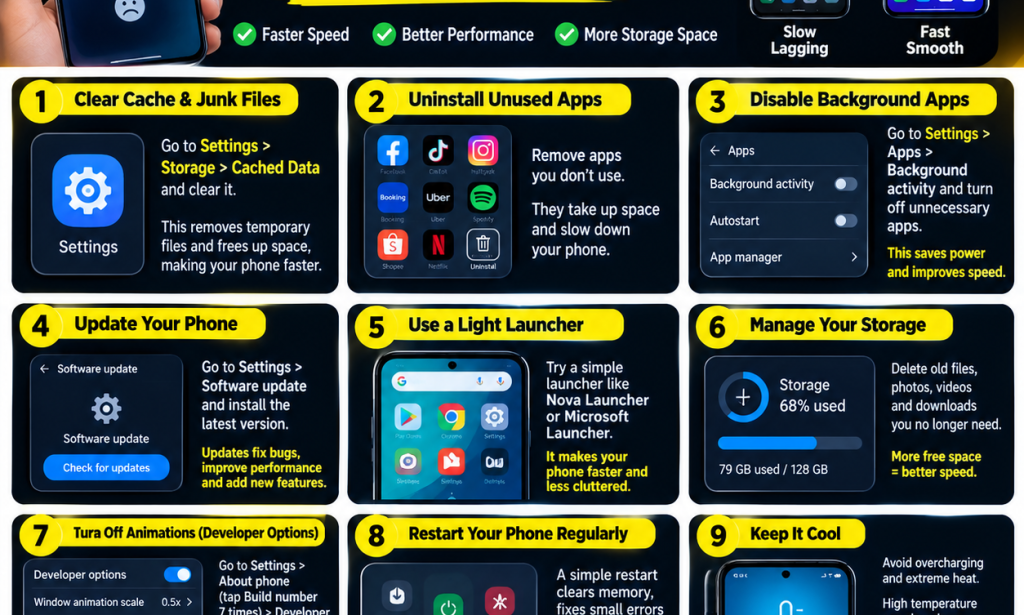
Is your phone slow, hanging, freezing, or taking too long to open applications? Before spending money on a new device, try a few simple steps to improve your phone's performance.
Whether you use an Android phone or an iPhone, keeping your device organised, updated, and cool can help it run more smoothly. You do not always need an expensive smartphone to enjoy a better mobile experience.
Here are 9 practical ways to make your phone faster and smarter.
1. Clear Unnecessary Files
Old videos, duplicate photos, downloaded documents, and other unwanted files can take up valuable storage space. If your phone is nearly full, it may become harder to manage apps and save new files.
Open your phone's storage settings and check which files are using the most space. Delete items you no longer need, but make sure you have backed up important photos and documents first.
Tip: On Android, you can also use the built-in storage management tools or the official Files by Google app to identify unnecessary files.
2. Uninstall Applications You No Longer Use
Do you have games and applications you installed months ago but never use? Removing unnecessary apps can free up storage space and reduce background activity from apps that would otherwise continue running.
Review your installed applications and uninstall those you no longer need. If you are unsure about an app, check what it does before removing it, especially if it is a system application.
3. Manage Background Applications
Some applications continue performing tasks when you are not actively using them. Depending on the app, this may consume battery power, mobile data, or system resources.
Check your phone's battery and app settings to identify applications with unusually high background usage. Restrict background activity for apps that do not need to update continuously.
However, avoid disabling background activity for apps that you rely on for important notifications, messaging, navigation, or other essential services.
4. Update Your Phone's Software
Software updates can fix bugs, improve security, and sometimes improve device performance. Keeping your applications updated can also help prevent compatibility problems.
To check for updates:
- Android: Open Settings and look for Software update or System update. The exact name varies by manufacturer.
- iPhone: Open Settings, select General, and tap Software Update.
- Apps: Open the official Google Play Store or Apple App Store and check for available updates.
Connect to a reliable network and ensure your phone has enough battery before installing a major update.
5. Keep Your Home Screen Simple
A home screen filled with widgets, live wallpapers, and unnecessary visual effects may use additional resources, particularly on older or lower-end phones.
Try using a simple wallpaper, removing widgets you rarely use, and keeping only your most important apps on the home screen.
This may reduce unnecessary activity and make your phone feel more responsive, although the improvement will depend on your device and launcher.
6. Keep Enough Storage Space Available
When your phone's internal storage is almost full, some tasks can become slower, and updates or app installations may fail.
Open Settings and check your available storage. Remove unnecessary downloads, clear large files you no longer need, and back up important media before deleting anything.
There is no single storage percentage that guarantees good performance on every phone, but avoiding a completely full storage drive is a useful habit.
7. Reduce Animations on Android
Some Android phones allow you to reduce animation effects through Developer Options. This can make transitions and menus appear faster, although it does not necessarily increase the phone's actual processing power.
On many Android devices, you can access these settings by following these steps:
- Open Settings and find About phone.
- Locate Build number or the equivalent software information field.
- Tap Build number several times, if your device uses this method, and follow any instructions to enable Developer Options.
- Return to Settings and open Developer Options.
- Find Window animation scale, Transition animation scale, and Animator duration scale.
- Reduce the scales to 0.5x if you want quicker transitions.
Important: Menu names and activation steps vary by manufacturer and Android version. Change only the animation settings you understand, and avoid altering unrelated Developer Options.
8. Restart Your Phone Regularly
If your phone suddenly becomes slow, freezes, or behaves unusually, restarting it may help. A restart can clear some temporary system problems and allow applications to start fresh.
To restart, press and hold the power button, or use the power menu available on your device, then select Restart.
You do not necessarily need to restart your phone every day. Do it when needed, particularly if you notice temporary performance problems.
9. Keep Your Phone Cool
Excessive heat can cause a phone to reduce its processing speed to protect its components. This may happen when playing demanding games, recording videos for a long time, charging in a hot environment, or using the phone under direct sunlight.
If your phone becomes unusually hot:
- Stop demanding games or applications temporarily.
- Move the phone away from direct sunlight.
- Disconnect the charger if the phone is overheating during charging and it is safe to do so.
- Allow the device to cool naturally in a shaded, well-ventilated place.
- Avoid placing the phone in a refrigerator or freezer to cool it quickly.
If your phone repeatedly overheats during normal use, consider having it checked by a qualified technician.
Bonus Tips for a Faster and Safer Phone
- Download applications from official app stores whenever possible.
- Avoid suspicious APK files and unknown download links.
- Clear unwanted browser downloads and website data when necessary.
- Use a secure screen lock to protect your personal information.
- Check battery health if your phone is old or its performance has declined significantly.
- Avoid installing multiple phone-cleaning or RAM-booster apps that promise unrealistic results.
- Back up important data before performing a factory reset.
What If Your Phone Is Still Slow?
If you have tried these tips and your phone is still extremely slow, the cause may be more serious. An ageing battery, limited RAM, a faulty storage component, a problematic app, or outdated hardware can affect performance.
Try identifying when the problem started. If the phone became slow after installing a particular app or update, that may help you narrow down the cause.
A factory reset can sometimes resolve persistent software problems, but it erases data stored on the device. Back up your important files and confirm that you know your account passwords before considering this step.
Conclusion
Making your phone faster does not have to be difficult. Clearing unnecessary files, uninstalling unused apps, managing background activity, installing updates, and keeping your device cool are practical ways to maintain good performance.
These steps will not turn every old phone into a new flagship device, but they may help your current smartphone work more smoothly and remain useful for longer.
Which phone do you use, and what problem are you experiencing? Let us know in the comments. Share your phone model and whether it is slow, hanging, overheating, or running out of storage.


You must be logged in to post a comment.