

🔐 HOW TO PROTECT YOUR FACEBOOK ACCOUNT FROM HACKERS
Facebook is one of the most popular social media platforms for connecting with friends, sharing pictures, watching videos, and promoting businesses. However, many people lose access to their accounts because of weak passwords, fake links, and online scams.
If you want to keep your Facebook account safe, follow these important tips.
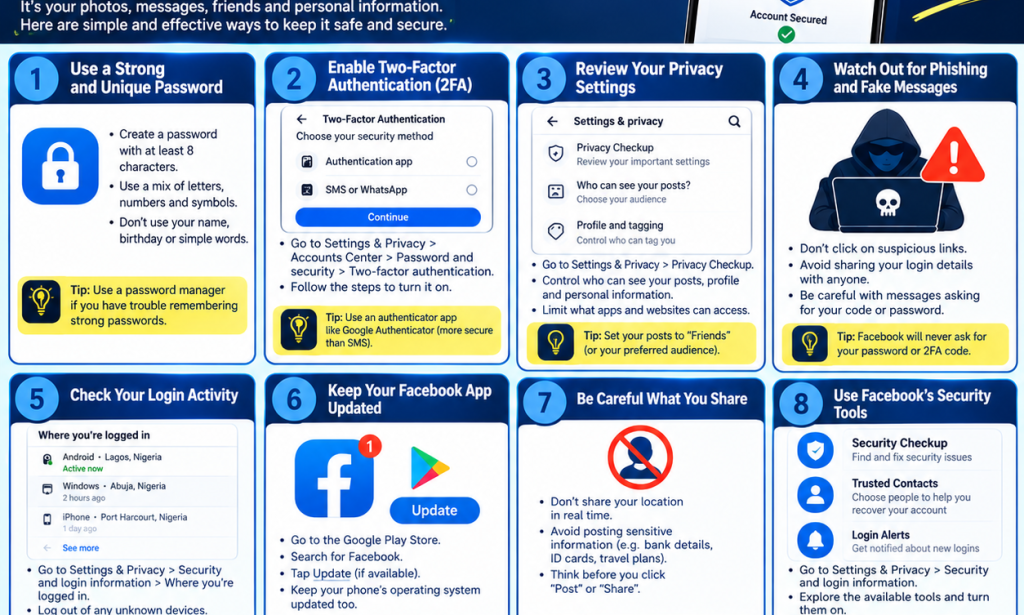
1. 🔑 Use a Strong Password
Create a strong password that is difficult for others to guess. Use a combination of letters, numbers, and symbols. Avoid using your name, birthday, or simple passwords like 123456.
Tip: Never use the same password for all your accounts.
2. 🛡️ Enable Two-Factor Authentication
Two-factor authentication adds an extra layer of security to your Facebook account. Even if someone discovers your password, they may still need another verification step to log in.
Go to your Facebook settings, open Accounts Center, select Password and security, and look for two-factor authentication.
3. 🚫 Avoid Clicking Suspicious Links
Hackers sometimes send fake messages claiming that your Facebook account will be suspended unless you click a link.
Do not enter your password on suspicious websites. Always check that you are using Facebook's official app or website.
4. 📱 Check Where Your Account Is Logged In
Regularly check the devices where your Facebook account is logged in. If you notice a device or location you do not recognize, log it out and secure your account.
You can check this under Accounts Center → Password and security → Where you're logged in.
5. 🔒 Keep Your Personal Information Private
Avoid sharing sensitive information publicly, such as your phone number, home address, passwords, or security codes.
Review your privacy settings to control who can see your posts and personal details.
6. 📩 Never Share Your Verification Code
Never give your Facebook verification code or password to another person. Someone may pretend to be Facebook support to trick you into giving away your account.
Remember: Your verification code is private. Keep it to yourself!
7. 🔄 Keep Your Facebook App Updated
Always update your Facebook app and your phone's software when updates are available. Updates can include important security improvements.
8. 🚨 Act Quickly If Your Account Is Hacked
If you believe someone has accessed your account without permission, change your password immediately if you still have access. Log out unfamiliar devices and check your account details.
If you cannot log in, use Facebook's official account recovery page to get help.
✅ CONCLUSION
Protecting your Facebook account is important. Use a strong password, enable two-factor authentication, avoid suspicious links, and never share your security codes.
Your online safety starts with you! 🔐
📢 SHARE THIS ARTICLE with your friends and family to help them protect their Facebook accounts.
👍 Like this post, comment “MY ACCOUNT IS SECURE”, and follow Vîçky Téè for more technology tips, educational content, entertainment, and useful information!


You must be logged in to post a comment.