

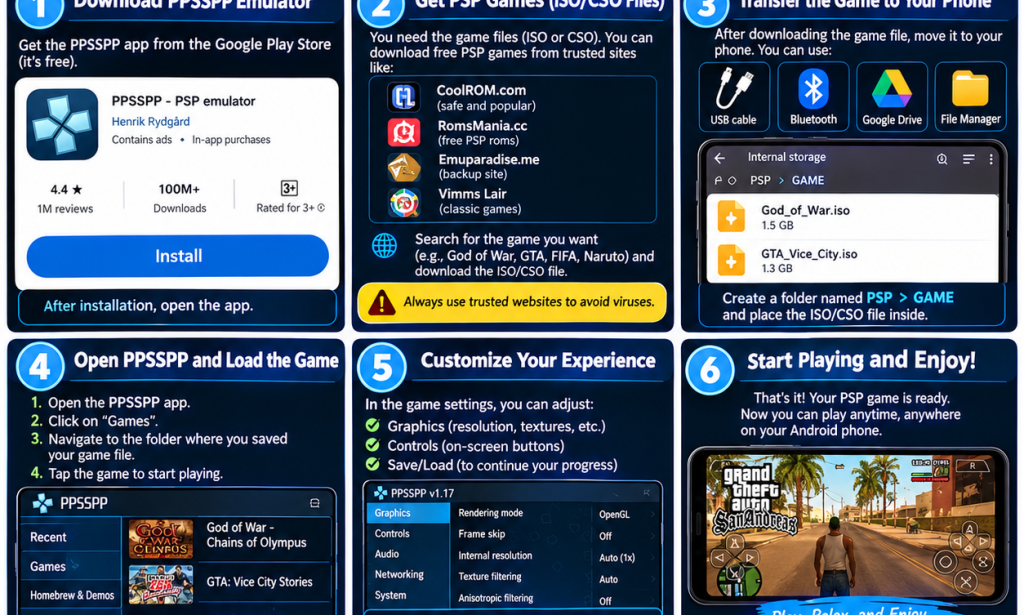
🎮 How to Play PPSSPP Games for Free on Your Android Phone
Do you want to enjoy exciting PSP games on your Android phone without buying a PlayStation Portable console? The good news is that you can use PPSSPP, a free PSP emulator, to play compatible PSP games on your smartphone.
You don't need an expensive phone or a computer to get started. With enough storage space and the correct game files, you can enjoy your favourite games right on your phone!
📱 What Is PPSSPP?
PPSSPP is a free application that allows you to play PlayStation Portable (PSP) games on Android devices and other supported platforms.
You can adjust the graphics, customize the controls, and save your progress while playing.
🔥 6 Steps to Start Playing PPSSPP Games
Step 1: Download PPSSPP
Visit the Google Play Store and search for PPSSPP – PSP emulator. Install the official app.
Step 2: Get a Compatible PSP Game File
PPSSPP normally uses game files in ISO or CSO format. You need a legally obtained copy of a compatible PSP game. Availability of free downloads depends on the game's copyright status.
Step 3: Save the Game File
If you already have a compatible game file, save it somewhere easy to find on your phone, such as a folder named PSP Games.
Step 4: Open PPSSPP
Launch the app and allow access to the relevant files when prompted. Navigate to the folder containing your game file.
Step 5: Adjust Your Settings
Open the settings to customize the graphics, sound, and on-screen controls. If your game runs slowly, try lowering the rendering resolution.
Step 6: Start Playing!
Tap the game displayed in PPSSPP to start playing. You can now enjoy your compatible PSP games on your Android phone.
⚽ Can You Play eFootball on PPSSPP?
You can play certain older football games released for the PSP, such as compatible versions of Pro Evolution Soccer (PES), using PPSSPP.
However, the modern eFootball mobile game is not a PSP game, so you cannot run its Android version directly inside PPSSPP. Be careful with websites claiming to offer an official “eFootball PPSSPP ISO”—these may provide unofficial modifications or unsafe downloads.
🏆 Popular PSP Games to Try
- Grand Theft Auto: Vice City Stories
- God of War: Chains of Olympus
- Tekken 6
- Pro Evolution Soccer (PES) PSP editions
- Naruto: Ultimate Ninja Heroes
Make sure you obtain game files legally and only download files from sources you trust.
💡 Tips for a Better Gaming Experience
- Keep enough free storage space on your phone.
- Close unnecessary apps before playing.
- Adjust the graphics if the game lags.
- Avoid suspicious download links and files that ask you to install unknown applications.
- Save your progress regularly.
🎯 Conclusion
PPSSPP is a great way to enjoy classic PSP games on your Android phone without paying for the emulator itself. Install the official app, obtain a compatible game file legally, adjust your settings, and start playing!
Enjoy your favourite PSP games, improve your gaming skills, and have fun! 🎮🔥


You must be logged in to post a comment.