

3 WhatsApp Privacy Settings You Should Change Now to Protect Yourself
Let me clear one thing first: WhatsApp is not reading your private chats. They are encrypted.
But your WhatsApp is still exposing you. Not to WhatsApp, but to strangers, ex-partners, scammers and people you do not even know.
These are the 3 settings to turn off now:
1. Profile Photo - Set To My Contacts
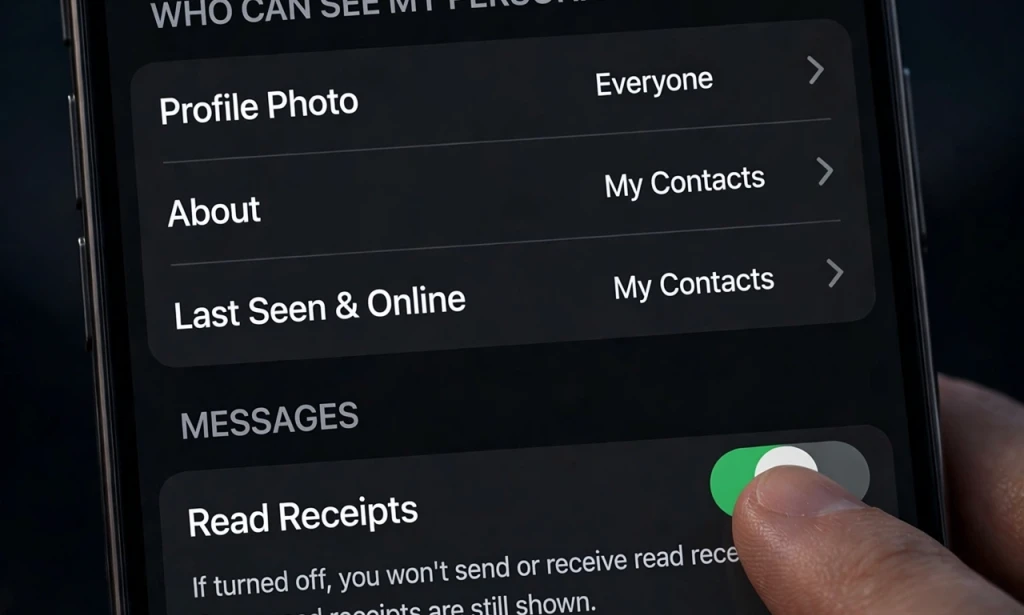
Right now, if your setting is on Everyone, any stranger who has your number can see your photo, download it, and use it to create fake account. Go to Settings - Privacy - Profile Photo - Change to My Contacts.
2. Last Seen And Online - Hide It
Scammers use Last Seen to know when you are active. Your ex uses it to stalk you. Go to Settings - Privacy - Last Seen and Online - Change to My Contacts or Nobody. Also turn off "Who can see when I am online" to Same as Last Seen.
3. Read Receipts And Groups - Control Them
If you turn off Read Receipts, people will not know you read their message. And check your Groups setting: Settings - Privacy - Groups - Change to My Contacts. If not, any stranger can add you to a scam group.
Bonus: Turn On Two-Step Verification
Go to Settings - Account - Two-Step Verification - Turn On. Add a 6-digit PIN. This stops someone from stealing your WhatsApp even if they get your SIM.
Conclusion
Do these 3 settings now. It will take you only 2 minutes, but it will save you from scam, stalking and fake accounts.
Have you checked your settings? Comment "DONE" if you just fixed yours.










































You must be logged in to post a comment.